|
Getting your Trinity Audio player ready...
|
Introduction
GoldenPi has introduced an Early Sell Option for selected bonds on its platform, giving investors more flexibility when managing their holdings. Unlike traditional bonds that are held till full maturity, this feature allows investors to sell their bonds earlier, based on predefined tenures.
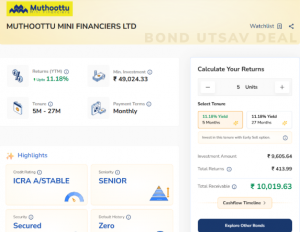
For instance, consider a bond from Muthoottu Mini Financiers Ltd. Assuming an investor plans to exit early, the bond may allow an early sell option after about 5 months. Otherwise, it continues until its complete 27-months maturity.
In this article, we’ll understand how this Early Sell process works and how investors can initiate it on the GoldenPi platform.
Understanding the Early Sell Process
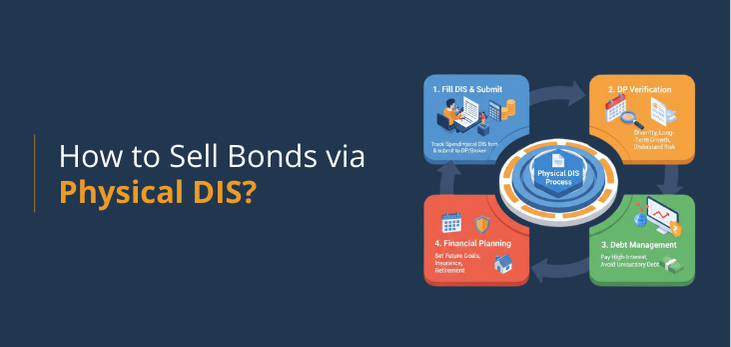
Unlike regular bond redemptions that are automatically settled at maturity, the early sell option works differently. Here, the investor must initiate the process manually, coordinating with multiple parties to complete the transaction smoothly.
This involves:
- Investor: who initiates the sell request and submits the required documents.
- Demat Broker: who processes the physical Delivery Instruction Slip (DIS) and executes the trade.
- ICCL (Indian Clearing Corporation Ltd.): which manages the settlement process on the BSE platform to ensure accuracy and timely fund transfer.
This structured approach ensures that every trade is verified, securely executed and settled on time, maintaining transparency and investor protection throughout the process.
What Investors Should Keep Ready
Before starting the early sell process, investors must keep a few key details and documents ready. Since this is a manual trade, accuracy in every step is crucial for a smooth settlement.
Here’s what you’ll need:
- Demat Account Details: Make sure your account is active and updated with the correct communication address.
- Physical Delivery Instruction Slip (DIS): This is a mandatory document required to authorise the transfer of bond units from your Demat account.
- What is a DIS?
A Delivery Instruction Slip is a physical form issued by your Demat broker. It allows you to debit securities (like bonds) from your account and transfer them to another party for settlement. In this case, it enables your broker to execute the early sell order.
- What is a DIS?
- Exchange and Settlement Details: Exchange Name, CM-BP-ID, CM Name, Market Type, Settlement Number and Date.
- ICCL Settlement Number and Date: These can be checked on the ICCL Settlement Details page before submission.
Note: eDIS (Electronic Delivery Instruction Slip) cannot be used for this transaction. You will need to arrange a physical DIS slip from your Demat broker. Upon your request, they will courier it to your registered communication address as per your Demat Account.
Step-by-Step Process to Initiate an Early Sell Order
Once you’ve arranged all the required documents, here’s how you can initiate the early sell process for your bond:
Step 1: Fill in the Physical DIS Slip
- Obtain the DIS slip from your Demat broker (if you don’t already have it).
- Carefully fill in all required details:
- Exchange Name: BSE
- CM-BP-ID: IN619994
- CM Name: ICCL
- Market Type: ICDM (T+0)
- Settlement Number and Date: Available on the ICCL Settlement Details portal.
Step 2: Courier the Filled DIS Slip to Your Demat Broker
- Send the completed and signed DIS slip to your Demat broker’s address (mentioned on the slip itself).
- Ensure that it reaches them at least two days before the settlement date to avoid processing delays.
Step 3: Confirm Transaction Execution
- Follow up with your broker to confirm that the sell order has been executed on the settlement date.
- Once the bond units are debited from your Demat account, inform the GoldenPi team via email or phone for tracking and confirmation.
Step 4: Settlement and Credit
- After successful execution, the settlement amount will be credited to your registered bank account on the same day.
Note: Always double-check details like ISIN, settlement number and broker address before dispatching the slip. A small mismatch can delay the trade execution.
How to Find the Settlement Number and Date
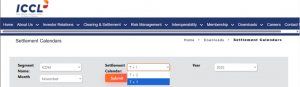
To complete your DIS slip correctly, you’ll need to mention the Settlement Number and Date – this is crucial for trade execution and timely settlement. Here’s how you can find it:
Step 1: Visit the ICCL Settlement Details page.
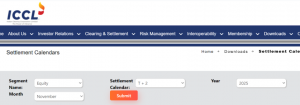
Step 2: Select ‘Corporate Debt Market (ICDM)’ from the available options.
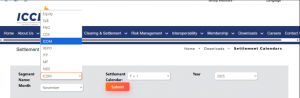
Step 3: You’ll see a list of upcoming settlement cycles with corresponding dates and numbers. Locate the most recent T+0 settlement cycle and note the Settlement Number and Settlement Date.
Step 4:
Enter these details in your DIS slip under the “Settlement Number & Date” field.
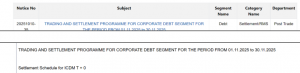
Note: Make sure to use the correct and active settlement number – using an outdated one may result in trade rejection or settlement delays.
Summary of the Early Sell Process on Short- Term Bonds
| Step | Action | Details / Notes |
| 1. Overview | Understand the process | Unlike regular bond redemptions (automatic at maturity), early redemption requires a manual process initiated by the investor. Coordination is needed between the Investor, Demat Broker and ICCL (Indian Clearing Corporation Ltd.), which handles settlements on the BSE platform. |
| 2. Preparation | Keep documents ready | Investors must arrange:
• Demat Account details • Physical DIS (Delivery Instruction Slip) — mandatory for authorising the transaction • Exchange name and settlement details • ICCL Settlement Number and Date (from ICCL portal). Note: eDIS cannot be used for this trade. Only physical DIS slips are accepted. |
| 3. Initiate Sell Request | Contact broker | The investor should raise a sell request through their Demat broker or depository participant (DP). The broker then forwards this instruction for execution on BSE’s platform. |
| 4. Submit DIS Slip | Authorise the transaction | The investor submits the physical DIS slip to their DP. This slip authorises the transfer of bonds from the investor’s Demat account to the exchange settlement pool. |
| 5. Settlement & Confirmation | ICCL processing | ICCL verifies and processes the trade. Once completed, the investor receives the sale proceeds in their linked bank account. This ensures secure and timely settlement through the clearing corporation. |
Need Help? Contact Us
If you have any doubts or need assistance while completing these steps, you can always reach out to us. Our support team will guide you through the process and help you complete your transfer without any hassle.
Frequently Asked Questions
1. How is the early bond sell process different from regular redemption?
Unlike regular bond redemption that happens automatically at maturity, the early sell option with Physical DIS is a manual process. Investors must coordinate with their Demat broker and ICCL (Indian Clearing Corporation Ltd.) to complete the trade and settlement through the BSE platform. You can also do the early sell process online, through NSDL Speed-e or CDSL Easiest.
2. What is a Delivery Instruction Slip (DIS) and why is it required?
A Delivery Instruction Slip (DIS) is a physical document that authorizes your Demat broker to debit the bond units from your account. It’s mandatory for this sell process since eDIS cannot be used. You must obtain it from your broker before initiating the sale.
3. How can I find the ICCL settlement number and date?
The settlement number and date are available on the official ICCL portal under the BSE ICDM (T+0) market section. Investors should always refer to the latest settlement details before filling the DIS slip to ensure accurate trade execution.
4. What should I do after filling out the DIS slip?
Once all details are filled, courier the DIS slip to your Demat broker’s address (mentioned on the slip). Ensure it reaches at least two days before the settlement date. Follow up with your broker to confirm execution and inform the GoldenPi team once done.
5. When will I receive the funds after selling my bonds?
After successful trade execution and debit confirmation, the settlement amount is credited to your bank account on the same day of the transaction. This ensures a smooth and timely settlement process through ICCL and your Demat broker.