To sell bonds (or other securities) using CDSL Easiest requires an off-market transfer or an on market transaction via clearing member. This involves moving the bonds from your demat account to the buyer’s demat account and settling the payment directly with the buyer, outside of the CDSL system.
If you have not yet registered for a CDSL Easiest account, you can find the necessary information and steps by clicking here.
Note: As per CDSL’s circular (WEB), to prevent incorrect transfers, all on-market/off-market transfers will be processed only if the sender (transferor) of the securities adds the receiver’s (transferee’s) demat account as a beneficiary on CDSL. Once you’ve added the beneficiary, you need to add that beneficiary as a Trusted account on CDSL Easiest, which takes 24 hours.
Let’s come back to the steps to sell bonds via CDSL Easiest:
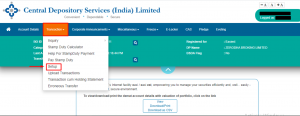
Step 1: Access the platform by logging in at [web.cdslindia.com/myeasitoken/home/login], then navigate to the ‘Transactions’ section and select ‘Setup’.
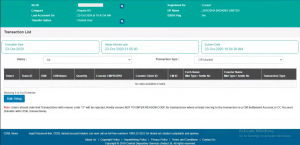
Step 2: Select the Bulk Setup option.
Step 3: Go to the Transaction section. Input the execution date and the Beneficiary Owner ID (BOID) of the recipient for the securities transfer. For the Entity Identifier, select “NA” from the drop-down menu.
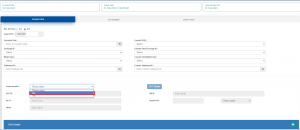
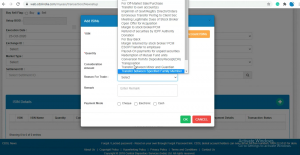
Step 4: Click on Account ISINs, choose the ISINs you want from your holdings, enter the quantity, and pick the reason for transfer. You can refer to the CDSL communique to select the correct reason code.
- You must also pay the stamp duty for this sale to CDSL through your virtual account number before completing the transfer.
- You can check the stamp duty amount here: cdslindia.com/stampduty/cal_stampduty.aspx.
You can add up to 10 ISINs at a time. After adding and temporarily authenticating one batch, go to Transaction → Bulk Setup to add the next set of 10. You can repeat this process as many times as needed. In the final batch, you’ll see a complete list of all transactions. Select them and complete the setup using your OTP and PIN.
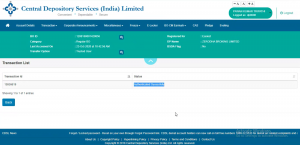
Step 5: Click on Submit. Then you’ll see a message saying that your settlement transaction has been temporarily set up along with a Transaction ID. Just verify and confirm it before the cut-off time.
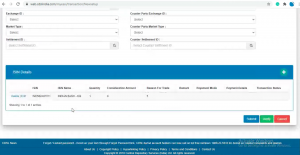
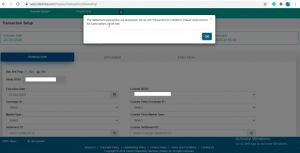
Step 6: Click on Verify.
For ON-Market transfers, you need to fill in fields like Exchange ID, Counterparty Exchange ID, Market Type, Counterparty Market Type, Settlement ID, or Counter-Settlement ID.
For off-market transfers, you don’t need to fill in fields like Exchange ID, Counterparty Exchange ID, Market Type, Counterparty Market Type, Settlement ID, or Counter-Settlement ID.
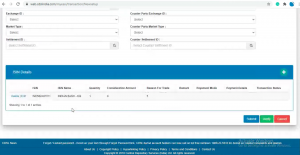
Step 7: Click on Commit and enter the OTP sent to your registered mobile number and email.
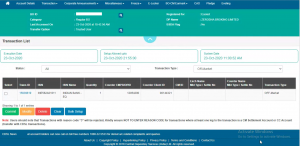
Step 8: Enter your 8-character CDSL Easiest PIN (this is alphanumeric and different from the 6-digit TPIN). If you are using it for the first time, you must change the default PIN.
Visit: web.cdslindia.com/myeasitoken/home/login → Miscellaneous → Change PIN.
If you did not receive the PIN or have forgotten it, go to the same link and select Reset PIN.
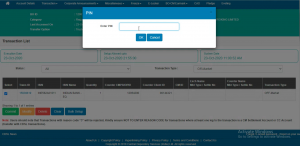
Last Step 9: Once submitted, your request goes to your Depository Participant (DP) for confirmation. After the DP approves it, the transfer is completed.
Selling bonds through CDSL Easiest is simply an off-market transfer from your demat account to the buyer’s demat account. Once you add the beneficiary, select the ISIN, enter the details, authenticate using OTP and PIN, and your DP approves it – the transfer is done.
The key steps are:
- Add beneficiary → Add as Trusted → Set up the transaction
- Enter reason, amount (if applicable), and stamp duty
- Verify → Commit → Authenticate
- DP confirms → Transfer completed
As long as each step is followed carefully, the process is smooth and secure.
Disclaimer: This content is intended solely for informational and educational purposes to explain the bond selling process. It does not constitute investment advice or a recommendation to buy or sell any bond or security. Procedures and requirements may change from time to time. Investors are advised to verify details with their Depository Participant and read all relevant documents carefully before taking any action.
Need Help? Contact Us
If you have any doubts or need assistance while completing these steps, you can always reach out to us. Our support team will guide you through the process and help you complete your transfer without any hassle.