Need to move units or shares from one demat account to another without going through the stock exchange? That’s an off-market transfer, and it’s common when you’re selling units privately, gifting securities to family, or shifting holdings to a new broker. For CDSL accounts in India, the usual online route is CDSL Easiest.
The process isn’t hard, but it has several approval stages, and a couple of them take days. This guide boils the whole demat-to-demat transfer down to five clear steps, so you know what to do and when.
Start investing with just ₹30K & grow your wealth with fixed return opportunities.
Invest Now

Before You Start: What You’ll Need
- The seller’s DP ID and Client ID (the account the units leave)
- The receiver’s DP ID, Client ID and PAN
- The mobile number and email linked to the seller’s demat account, since every OTP goes there
- The ISIN of the security and the agreed consideration amount
- Time in hand: registration and trusted account mapping can each take 2-3 working days
Demat Transfer Timeline at a Glance
| Step | What happens | Typical time |
| 1. CDSL Easiest registration | One-time setup | 2-3 working days |
| 2. Receiver BO linking and OTP approval | Links buyer to seller | Usually done in one sitting |
| 3. Trusted account and PIN | Your DP maps the receiver; PIN arrives by email | 2-3 working days |
| 4. Stamp duty payment | Calculate and pay online | A few minutes |
| 5. Transfer and authentication | OTP + PIN; units debited | Execution date you choose |
If you’re working against a deadline, start Steps 1 and 3 early. They’re the ones that eat the calendar.
Step 1: Register on CDSL Easiest
Open the CDSL Easiest login page and click the registration link. Enter the seller’s DP ID and Client ID, then verify the OTPs sent to the mobile and email registered with the demat account. Next, pick a username, a security question and its answer, and select “Trusted Account (PIN)” as the account type.
That last choice matters. It lets you transfer to pre-approved accounts using a PIN. Already registered? Skip ahead.
Step 2: Link the Receiver’s Demat Account and Approve with OTP
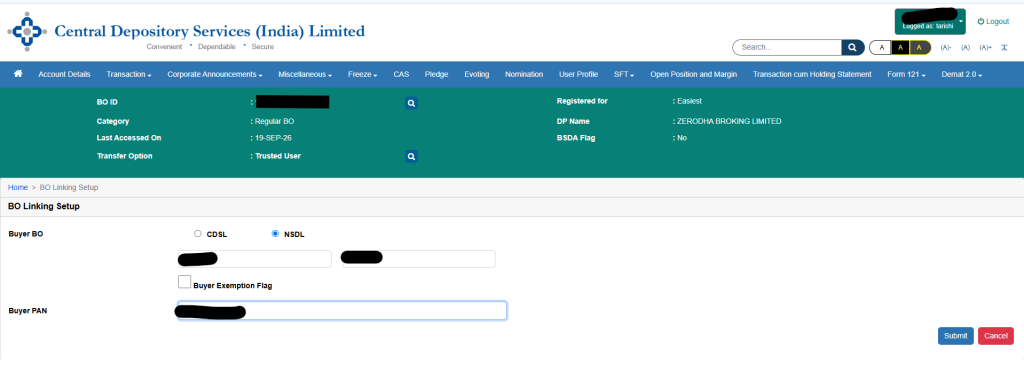
Log in and go to Miscellaneous → BO Linking → BO Linking Setup. Choose whether the receiver’s account is with CDSL or NSDL, then enter their account details and PAN. For an NSDL account, the DP ID and Client ID go in two separate boxes. Check everything against the receiver’s records before you submit.
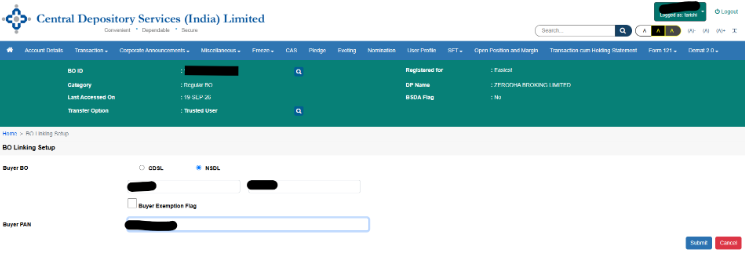
Then comes the seller-side approval. Open CDSL’s OTP verification page, enter the seller’s PAN or demat details, click Submit, and choose “BO Seller Link.” Verify both accounts, click “Generate OTP,” and confirm with the code sent to the seller. You’ll see a message that the transaction was accepted.
For example: say Rohan in Gurugram is selling some units to his friend Priya. He links her BO and PAN first, then approves the link himself with the OTP on his own phone.
Step 3: Add the Trusted Account and Set Your PIN
Back in Easiest, go to Miscellaneous → Edit Trusted Account → Add Trusted Account and enter the receiver’s BO ID (DP ID plus Client ID). The request goes to your Depository Participant (DP), which maps the account in about 2-3 working days.
Within a similar window, CDSL emails you a PIN for authenticating transfers. It’s advisable to change it right away under Miscellaneous → Change PIN: enter the old PIN, then the new one twice.
Step 4: Calculate and Pay Stamp Duty
Off-market transfers that involve a sale attract stamp duty. The standard rate is 0.015% on the consideration amount, and the depository collects it. The seller pays, and it must be done before you initiate the transfer.
For example: if Rohan sells his units to Priya for ₹18,000, the duty is ₹2.70. On ₹5,00,000, it would be ₹75.
On CDSL’s stamp duty calculator, choose “Other Transactions,” enter the ISIN and probable consideration, and click Calculate. Then click Stamp Duty Payment, select the BO, check the auto-fetched name, add your mobile number and email, enter the duty amount and captcha, and click Proceed for Payment. Choose your payment mode to finish.
Transfers with no consideration, such as moving units between your own accounts, are typically exempt from stamp duty. Your DP may still charge a transfer fee.
Latest Bong Guides:
- How to Claim Bond Coupons Sent to a Closed Bank Account

- Guaranteed Bonds in India: How They Work, Key Risks, and What to Check

- CE and SO Ratings: How Credit Enhancement Changes Bond Risk

Step 5: Initiate the Transfer and Authenticate with OTP and PIN
Go to Transactions → Setup → Bulk Setup. Select Sell, pick the execution date, choose the trusted receiver from the Counter BO dropdown, and set the Entity Identifier to NA.
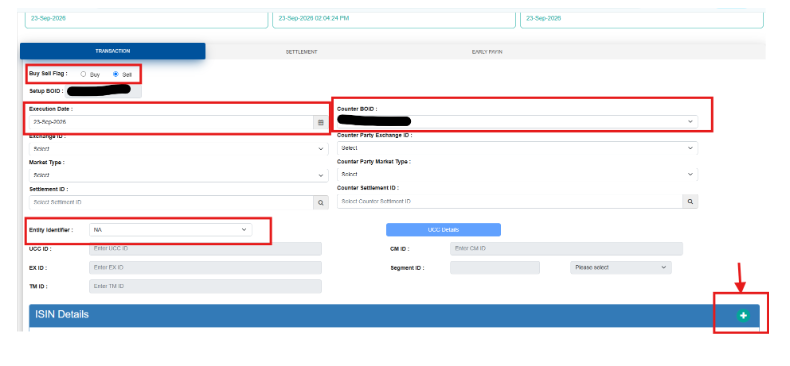
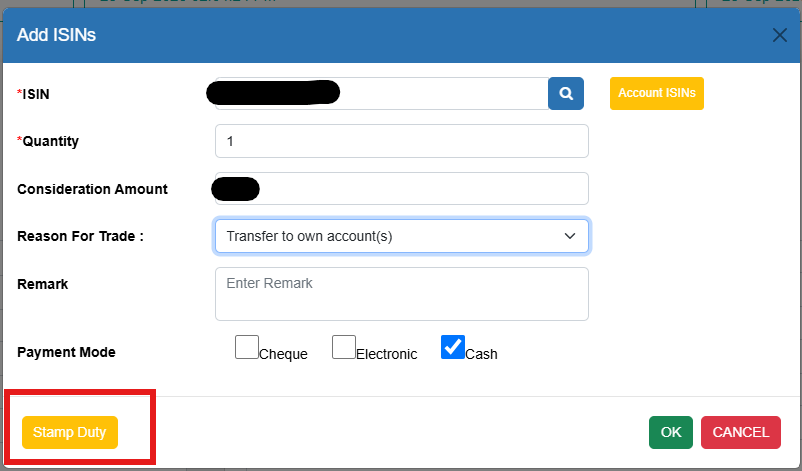
Click the icon to add ISIN details, then enter the ISIN, quantity, consideration, reason for trade (for instance, “Transfer to own account(s)”) and payment mode. Use the Stamp Duty button to confirm you’ve paid enough, then click OK.
Review the summary and click Commit. An OTP arrives on your mobile and email. Enter it, then your PIN. Once authentication succeeds, you’ll see a confirmation. On the execution day, the seller gets an email confirming the debit, and the units are then credited to the receiver’s account.
Common Demat Transfer Mistakes to Avoid
- Mismatched details: a wrong DP ID, Client ID or PAN is an easy way to stall the process.
- Starting too late: two separate waiting periods mean you can’t do this in a day.
- Mixing up PINs: once you’ve changed the emailed PIN, only the new one will work.
- Skipping the stamp duty check: verify sufficient duty is available before you commit.
Final Thoughts
Think of this as two phases: a slow one (registration and mapping) and a quick one (stamp duty, OTP, PIN). Get the slow part done in advance, and the transfer itself takes minutes. Rates and DP charges can change, so confirm current figures with CDSL and your DP before you transact.
Disclaimer
Fixed returns do not constitute guaranteed or assured returns. Investments in corporate debt securities and municipal debt securities/securitized debt instruments are subject to credit risks, market risks, and default risks, including delay and/or default in payment. Read all the offer-related documents carefully. This blog/article should not be construed as financial advice or as an offer or recommendation to buy or sell any security or any products/services of/on GoldenPi or any product/services of its third-party client(s). For a detailed calculation of YTM, visit our website. T&C’s Apply.